Vocal EQ Cheat Sheet: Where to Cut and Boost
A practical frequency chart for mixing vocals: what lives where, what to cut, what to boost, and how the approach changes from pop to hip-hop to R&B.
- High-pass around 80–120 Hz to remove rumble (lower for deep voices, higher for light ones).
- Cut mud or boxiness at 250–500 Hz, usually 2–3 dB, only if you hear it.
- Add presence at 2–5 kHz so words cut through.
- Tame sibilance at 5–9 kHz with a de-esser rather than a static cut.
- Add air with a gentle high shelf from 10–16 kHz.
Vocal EQ frequency chart
Every voice and microphone is different, so treat these as places to look, not settings to copy. Sweep a narrow boost through each range to find the exact problem frequency, then cut it.
| Range | What lives there | Typical move |
|---|---|---|
| Below 80–120 Hz | Rumble, handling noise, plosive thumps, room noise | High-pass filter. Set it as high as you can before the voice starts to thin out. |
| 120–250 Hz | Body and warmth (lower end for deeper voices) | Leave alone or a small boost for thin voices; cut if the vocal feels heavy. |
| 250–500 Hz | Mud and "boxiness", especially with untreated rooms | Cut 2–3 dB with a medium-width bell if the vocal sounds cloudy or boxy. |
| 800 Hz–1.5 kHz | Nasal, honky tone | Narrow cut if the voice sounds like it's singing through its nose. |
| 2–5 kHz | Presence and intelligibility: this is where consonants live | Gentle boost for clarity. Too much sounds harsh, so check at high volume. |
| 5–9 kHz | Sibilance ("s", "t", "sh" sounds) | De-esser, or a dynamic EQ that only cuts when the "s" happens. |
| 10–16 kHz | Air and breath | High shelf boost for an open, expensive sound. Add after de-essing. |
Rule of thumb: cut narrow, boost wide. Narrow cuts remove a problem without changing the character of the voice; wide, gentle boosts sound more natural than sharp peaks.
A vocal chain that works in most genres
- High-pass filter to clear everything below the voice.
- Subtractive EQ: remove mud, boxiness or nasal resonances.
- Compression: two gentle compressors in series often sound more natural than one working hard. For example a fast FET-style compressor to catch peaks, then an optical-style compressor for overall level (roughly 3:1–4:1, 10–30 ms attack).
- De-esser after compression, because compression brings sibilance up.
- Additive EQ: presence and air, now that the problems are gone.
- Reverb and delay on sends, not directly on the vocal track.
Before any of this, ride the vocal level with volume or clip-gain automation. When the compressor gets a more even signal it can work more gently, and the vocal sounds more natural.
See every element on one map
MixMap plots all of this for 63 elements across Pop, Hip-Hop, R&B, Electronic and Indie: frequency, pan, width, level, compression, reverb and delay. Click an element to get its settings.
EQ the vocal in context, not in solo
A vocal that sounds perfect on its own can disappear in the full mix. Make EQ decisions with the whole track playing. If the vocal is masked, it's often better to make small cuts in the competing instruments (guitars, keys, synths) around 300–500 Hz and 2–4 kHz than to keep boosting the vocal.
How vocal EQ changes by genre
Pop
The lead vocal owns the centre of the mix and gets the most headroom; everything else is EQ'd to make room for it. Presence around 3–4 kHz and an air shelf are common. A plate reverb of around 1.2–1.8 seconds with 30–60 ms pre-delay keeps the start of each word clear.
Hip-hop and rap
Clarity comes first. Consonants live around 2–5 kHz, so presence there (with a de-esser or dynamic EQ controlling harshness) keeps every word intelligible. Keep reverb on the lead short or leave it dry, and use delay throws on single words instead.
R&B
Protect the dynamics. The loudest and softest moments carry the emotion, so ride the fader and use gentle, slower-attack compression. Warmth in the 120–250 Hz range is often kept rather than cut.
Indie
Anything from close-miked and intimate to roomy and upfront. Start with less processing and add only what the song needs.
Background vocals and harmonies
- High-pass higher than the lead, around 150–200 Hz, so stacks don't build up low-mid mud.
- Low-pass around 8–10 kHz so they don't compete with the lead vocal's air.
- Pan them wide, often as left/right pairs of separate takes.
- Give them a little more reverb than the lead to push them behind it.
Common vocal EQ mistakes
- Boosting presence to fix a masked vocal. It usually just adds harshness; carve space in the instruments instead.
- Adding air before de-essing. The shelf boosts the "s" sounds too.
- Cutting the same frequencies on every vocal. Every voice is different, so sweep and listen before you cut.
- Judging at one volume. Check quietly (can you understand every word?) and loudly (is it harsh?).
MixMap — The Complete Mix Reference
Stop searching for the same settings every session. One interactive reference with starting points for every element in 5 genres, with pan values for Logic, Ableton, FL Studio and Pro Tools.
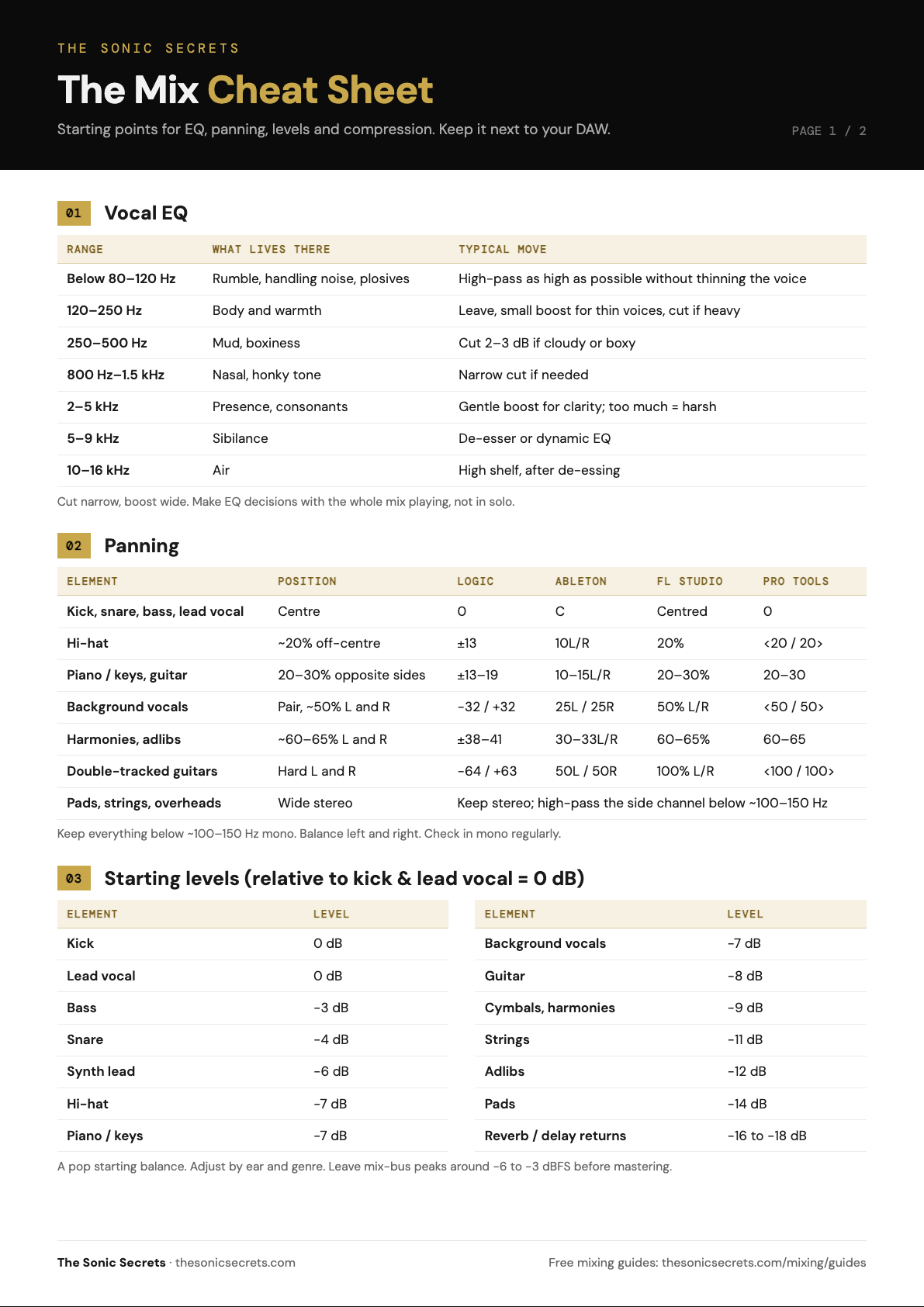
Get the 2-page Mix Cheat Sheet
Vocal EQ, panning with DAW values, starting levels, compression and reverb settings on two printable pages.
Your cheat sheet is ready. A copy is on its way to your inbox too.
DOWNLOAD PDF →