Panning Cheat Sheet: Where to Pan Every Instrument
Where each instrument usually sits in the stereo field, the same positions converted to Logic, Ableton, FL Studio and Pro Tools values, and the rules that keep a mix wide but solid.
- Keep centred: kick, snare, bass, lead vocal (and anything with a lot of low end).
- Pan wide: background vocals, harmonies, double-tracked guitars, pads, strings, overheads.
- Balance the sides: if something sits left, put something with a similar role and range on the right.
- Keep the low end mono, roughly below 100–150 Hz.
- Check in mono regularly so nothing disappears.
Panning cheat sheet: where to put every instrument
These are typical starting points for a modern pop mix. "L50 / R50" means a pair of separate takes, one on each side. Adjust to your arrangement: the goal is a balanced, uncluttered stereo image.
| Element | Pan position | Why |
|---|---|---|
| Kick | Centre | Carries low-end energy; both speakers share the load. |
| Snare | Centre | The backbeat anchors the groove. |
| Bass / 808 | Centre | Low frequencies should be mono for club systems and mono playback. |
| Lead vocal | Centre | The focus of the song and the most important element. |
| Hi-hat | Slightly off-centre (about 15–25%) | Adds a natural, drum-kit feel. Balance with a shaker or ride on the other side. |
| Overheads / cymbals | Wide stereo | They create the high-frequency width of the kit. |
| Background vocals | L50 / R50 pair | Width around the lead without masking it. |
| Harmonies | About L60 / R60 | Wide and supportive, behind the lead. |
| Adlibs | About L65 / R65, varied | Energy at the edges of the mix, away from the lead. |
| Rhythm guitar | About 30% one side, or double-tracked hard L/R | Two different takes panned hard give a wide, natural image. |
| Piano / keys | About 20% opposite the guitar | Balances the guitar across the stereo field. |
| Synth lead | Centre, widened | Keep the core in the middle so it survives mono; add width with detune or chorus. |
| Pads / strings | Wide stereo | Fill the sides at a low level. |
| Vocal delay | Opposite side, or ping-pong | Adds width and depth without cluttering the centre. |
Pan values in your DAW
Every DAW shows pan differently. Here is the same position in each one:
| Position | Logic Pro | Ableton Live | FL Studio | Pro Tools |
|---|---|---|---|---|
| Hard left | −64 | 50L | 100% L | <100 |
| Half left | −32 | 25L | 50% L | <50 |
| Slightly left (20%) | −13 | 10L | 20% L | <20 |
| Centre | 0 | C | Centred | 0 |
| Slightly right (20%) | +13 | 10R | 20% R | 20> |
| Half right | +32 | 25R | 50% R | 50> |
| Hard right | +63 | 50R | 100% R | 100> |
Logic's pan knob runs from −64 to +63 and Ableton's from 50L to 50R, so their "halfway" values look smaller than the percentages suggest.
See every element on one map
MixMap plots all of this for 63 elements across Pop, Hip-Hop, R&B, Electronic and Indie: frequency, pan, width, level, compression, reverb and delay. Click an element to get its settings.
The rules that matter most
1. Keep the low end in the middle
Kick, bass and 808 carry most of a mix's energy. Keeping them centred shares that energy between both speakers, and keeping everything below roughly 100–150 Hz mono avoids problems on club systems, Bluetooth speakers and phones. On wide synths and pads you can high-pass the side channel with a mid/side EQ.
2. Balance left and right
Think in pairs. A guitar on the left wants a keyboard, a second guitar or a percussion part on the right. A mix that leans to one side feels unfinished, especially on headphones.
3. Double-track instead of copying
Panning a duplicated track hard left and right doesn't make it wide; it just sounds like a louder mono track. Record two separate performances and pan those. Small differences in timing and tone create real width.
4. Width is more than panning
Panning places a mono source; stereo width spreads a stereo source. Chorus, unison detune, stereo reverbs and ping-pong delays all add width. Keep the most important elements (lead vocal, kick, bass) narrow so the wide elements have something to contrast with.
5. Always check in mono
Plenty of listening happens on mono or near-mono speakers. Sum your mix to mono every so often: if a synth, pad or backing vocal drops noticeably, it's too wide or out of phase.
Drum panning: drummer or audience perspective?
Choose one and stick with it. In drummer perspective (for a right-handed kit) the hi-hat sits slightly left and the floor tom right; audience perspective flips it. Neither is wrong, but mixing them within one song makes the kit sound confused.
Panning by genre
- Pop: centred lead, wide vocal stacks, pads and strings filling the sides.
- Hip-hop: dry, centred rap vocal and a mono 808; hook vocals and adlibs pushed wider.
- Rock and indie: two different guitar takes panned hard left and right, drums with room mics for natural width.
- Electronic: mono kick and sub; wide pads, effects and ping-pong delays; width often automated to build energy.
MixMap — The Complete Mix Reference
Stop searching for the same settings every session. One interactive reference with starting points for every element in 5 genres, with pan values for Logic, Ableton, FL Studio and Pro Tools.
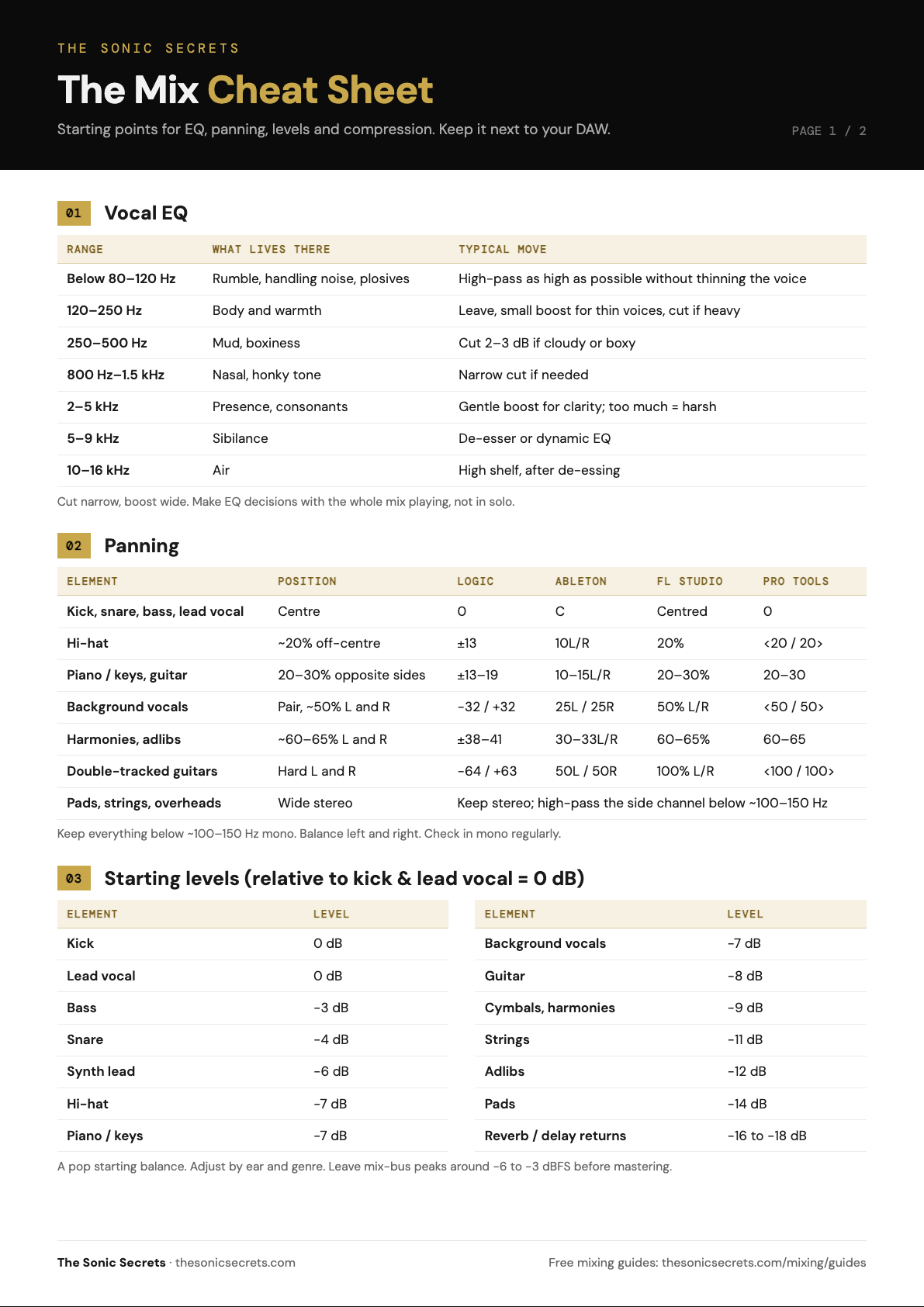
Get the 2-page Mix Cheat Sheet
Vocal EQ, panning with DAW values, starting levels, compression and reverb settings on two printable pages.
Your cheat sheet is ready. A copy is on its way to your inbox too.
DOWNLOAD PDF →