How Loud Should Each Instrument Be in a Mix?
A starting balance for every element relative to the lead, how it changes by genre, and a step-by-step way to build a static mix with the right headroom.
- Start with the most important element, usually the kick or the lead vocal, and set everything else relative to it.
- In pop and hip-hop, kick, bass/808 and lead vocal are typically the loudest things in the mix.
- Supporting parts such as pads, strings and background vocals often sit 7–14 dB below the lead.
- Leave headroom: keep mix-bus peaks around −6 to −3 dBFS if the track will be mastered.
- Check at low volume and against a reference track matched in loudness.
Starting levels for a pop mix
Levels relative to the loudest elements (0 dB = kick and lead vocal). These are a starting balance for a static mix before automation. Every arrangement is different, so use your ears to adjust.
| Element | Relative level | Role |
|---|---|---|
| Kick | 0 dB | The rhythmic anchor |
| Lead vocal | 0 dB | The focus of the song |
| Bass | −3 dB | Low-end foundation with the kick |
| Snare | −4 dB | Backbeat |
| Synth lead | −6 dB | Hooks between vocal lines |
| Hi-hat | −7 dB | Timekeeping and energy |
| Piano / keys | −7 dB | Harmony |
| Background vocals | −7 dB | Width and support |
| Guitar | −8 dB | Rhythm and texture |
| Cymbals | −9 dB | High-frequency width |
| Harmonies | −9 dB | Supporting the lead |
| Strings | −11 dB | Emotional lift |
| Adlibs | −12 dB | Energy in the gaps |
| Pads | −14 dB | Felt more than heard |
Reverb and delay returns usually sit even lower: often around −16 to −18 dB relative to the lead, blended until you miss them when muted.
How levels change by genre
- Hip-hop / trap: the 808 and the rap vocal lead, with the snare or clap close behind; melodies sit well under the vocal (around −8 dB). Adlibs lower and wider.
- R&B: the vocal slightly on top, bass warm and full, drums a touch softer than in pop so the groove breathes.
- Electronic: kick and sub dominate; the lead synth takes the vocal's role; pads and effects fill the background.
- Indie / rock: guitars much louder and closer to the vocal; drums often more natural with room sound.
See every element on one map
MixMap plots all of this for 63 elements across Pop, Hip-Hop, R&B, Electronic and Indie: frequency, pan, width, level, compression, reverb and delay. Click an element to get its settings.
How to build a balanced static mix
- Gain-stage first. Trim each track so its peaks sit comfortably below 0 dBFS (many engineers aim for around −18 dBFS average), which keeps plugins in their sweet spot and leaves headroom.
- Start with your anchor. Bring up the kick (or the lead vocal) first, peaking around −10 to −6 dBFS on the master.
- Add elements in order of importance: bass, snare, lead vocal, then the main musical parts, then supporting layers.
- Use faders before plugins. Many "EQ problems" are really level problems.
- Leave headroom on the mix bus: peaks around −6 to −3 dBFS if someone else is mastering.
Ways to check your balance
- Listen quietly. At low volume the balance is easier to judge: the important parts should still come through.
- Use a reference track in the same genre, matched in loudness, and switch between them.
- Check in mono to catch parts that disappear or get too loud when summed.
- Try other speakers: phone, earbuds, car. If the vocal or bass vanishes somewhere, fix the balance.
- Take breaks. Your ears adapt quickly; fresh ears hear balance problems instantly.
What about loudness for streaming?
Streaming services turn loud tracks down to a common level: Spotify normalizes to about −14 LUFS by default and Apple Music to about −16 LUFS. That's handled at the mastering stage (see how much each service turns your master down with the LUFS calculator). While mixing, focus on balance and leave headroom; a well-balanced mix gets loud more easily in mastering than a crushed one.
Common level mistakes
- Everything slowly creeping louder until the master clips. Pull all faders down together and rebalance.
- Burying the vocal because you know the lyrics. Ask: could someone who's never heard the song understand every word?
- Balancing only in solo. Levels only make sense with the whole mix playing.
- Too much low end on studio monitors or headphones with a bass boost. Check on neutral speakers or a reference.
MixMap — The Complete Mix Reference
Stop searching for the same settings every session. One interactive reference with starting points for every element in 5 genres, with pan values for Logic, Ableton, FL Studio and Pro Tools.
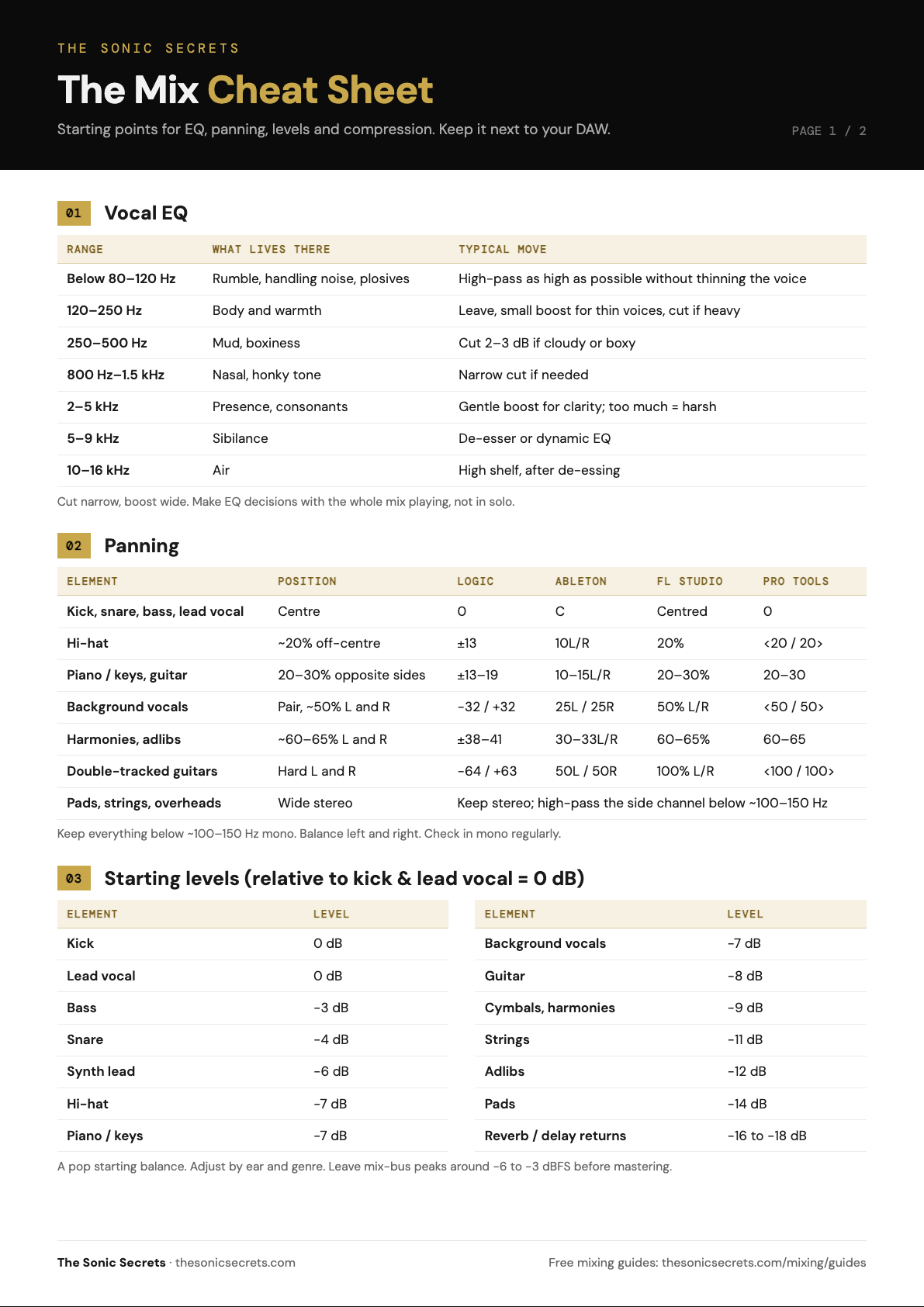
Get the 2-page Mix Cheat Sheet
Vocal EQ, panning with DAW values, starting levels, compression and reverb settings on two printable pages.
Your cheat sheet is ready. A copy is on its way to your inbox too.
DOWNLOAD PDF →